M4A to WAV: Convert and Check Your File
To convert M4A to WAV, open the SWRFlow converter, choose one unprotected AAC M4A, select 44.1 or 48 kHz, and click Convert to WAV. Preview the result, then download it. The output is 16-bit PCM WAV; the input limit is 50 MB.
On this page
Choose the output your destination needs
The converter defaults to 44.1 kHz and also offers 48 kHz. Match the requirement of the app or project receiving your file. Mono input stays mono, and stereo stays stereo; there is no channel selector or 24-bit output option. SWRFlow test record
Selecting a different rate can resample the decoded audio. Web Audio decodes into the audio context's sample rate, so a 48 kHz export does not establish that the recording originally contained 48 kHz samples. MDN: audio decoding
What our four exported files contained
We converted two synthetic, two-second AAC M4A fixtures, one mono and one stereo, using Chrome 154 on Windows on October 1, 2026. Both inputs used 44.1 kHz. We exported each at both available rates and inspected the resulting WAV bytes. SWRFlow test record
All four outputs contained a RIFF/WAVE header, integer PCM format, 16-bit samples, and two seconds of audio. Mono remained mono and stereo remained stereo in these checks. SWRFlow test record
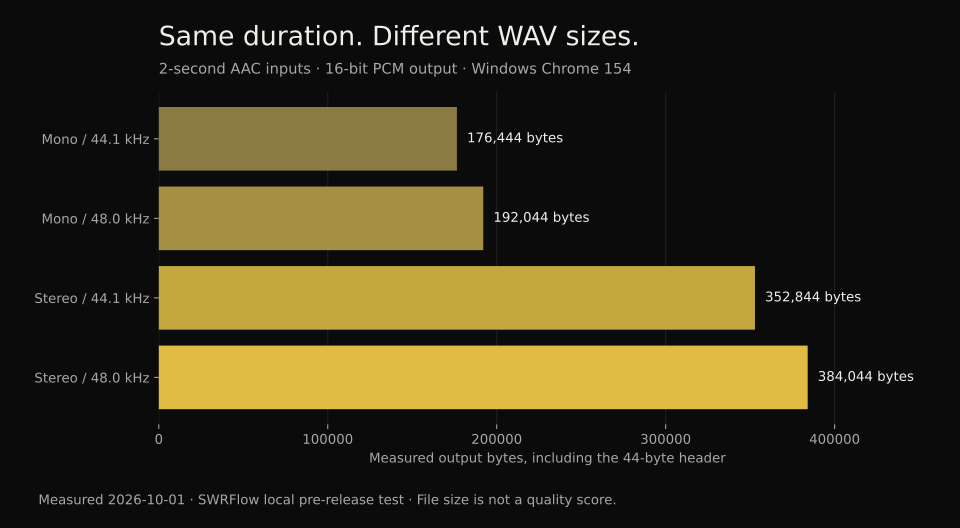
We also downloaded the stereo 44.1 kHz result and inspected that saved file with ffprobe. It reported pcm_s16le, two channels, 44,100 samples per second, and 352,844 bytes. The same fixture on the live converter produced an identical SHA-256 hash. SWRFlow test record
| Channels | Output rate | File bytes |
|---|---|---|
| Mono | 44.1 kHz | 176,444 |
| Mono | 48 kHz | 192,044 |
| Stereo | 44.1 kHz | 352,844 |
| Stereo | 48 kHz | 384,044 |
Why the size changes
For these two-second outputs, file bytes = 44 + 2 × sample rate × channel count × (16 / 8). The 44-byte header, duration, rates, channels, and bit depth come from our encoder and inspected files; Microsoft's PCM definition supplies the channel-count-times-bit-depth relationship. SWRFlow test record Microsoft: PCM format fields
For the stereo 44.1 kHz result, that is 44 + 2 × 44,100 × 2 × 2 = 352,844 bytes. Subtract the 44-byte header before comparing payloads: stereo doubles the mono payload at the same rate. The table describes these fixtures, not every WAV encoder. SWRFlow test record
A larger WAV cannot recover information discarded by lossy compression. Apple explains that converting compressed audio back to an uncompressed format does not restore lost data. Changing the format is useful when an application requires it; file growth alone is no evidence of improved sound. Apple: format conversion
Why an M4A might fail here
Our mono 48 kHz ALAC M4A fixture failed to decode in the tested Windows Chrome browser, while the AAC fixtures succeeded. The .m4a suffix alone was therefore insufficient to predict success in this test. We have not verified ALAC behavior in other browsers. SWRFlow test record
A separate six-channel AAC fixture reached the tool's channel check and was rejected. A damaged fixture also failed. These results support the stated mono/stereo and readable-file limits; they do not demonstrate a repair function. SWRFlow test record
SWRFlow accepts one file of at most 50,000,000 bytes and caps the generated WAV at 200,000,000 bytes. Browser memory and decoder support still matter below those limits. Tags and cover art are not copied, and protected recordings are outside this workflow. SWRFlow test record
Check the exported recording
The converter processes audio in the browser. During our local and live conversion checks, no fetch or XHR requests occurred, and the tool page's connection policy was set to connect-src 'none'. The download was generated from a local audio Blob. SWRFlow test record
Before handing the WAV to another app, listen to the preview and check the displayed duration, channel count, and sample rate. If you need artwork, tags, more channels, or a different bit depth, this converter's current output does not meet that requirement. SWRFlow test record